

Yes, a school emergency notification system can work entirely via text message without requiring an app. BluePoint Alert Solutions provides a text-first architecture that sends SMS alerts to staff, parents, and first responders instantly upon activation. This guide covers how to choose, verify, and implement a text-based system that ensures rapid, reliable communication during critical incidents.
How to Choose a Text-First System
Selecting a notification system requires looking beyond marketing claims to the underlying infrastructure. A robust text-first system is defined by its ability to deliver messages through redundant pathways, ensuring that if one carrier fails, another takes over. You must evaluate the vendor's central station reliability, as this is the hub that processes and routes your alerts. Look for systems that offer two-way communication, allowing staff to reply to alerts with status updates like "I am safe" or "Need help." This interactive capability transforms a simple broadcast into a coordinated response tool. BluePoint Alert Solutions emphasizes this interactivity, ensuring that administrators can receive real-time feedback from building occupants during an incident.
Infrastructure Redundancy
The backbone of any reliable system is its communication redundancy. A single point of failure, such as a reliance on a single cellular carrier, is a critical risk. Verify that the system uses multiple carriers and backup power sources. The central station should be UL-listed and FM-approved, which are industry standards for high-reliability monitoring. These certifications ensure that the facility has the necessary disaster recovery plans and power backups to maintain operations during outages.
User Experience Simplicity
During a crisis, users cannot navigate complex interfaces. The activation mechanism must be intuitive, often modeled after familiar fire alarm pull stations. The notification itself should be clear, concise, and actionable. Avoid systems that require users to download an app to receive critical safety information. Text messages have a near-universal open rate and do not depend on app permissions or battery optimization settings that might suppress notifications.
What to Ask Before Committing
Before signing a contract, you need to ask specific technical and operational questions. Start by asking about the delivery mechanism. Does the system use a dedicated short code, a toll-free number, or a standard mobile number? Dedicated short codes often have higher throughput but can take longer to provision. Ask about the latency between activation and delivery. In an emergency, seconds matter. You want a system that can send thousands of messages in under a minute. Also, inquire about the testing capabilities. Can you schedule automated tests to ensure the system is working without alerting the entire school community? Regular testing is crucial for maintaining readiness.
Integration Capabilities
Ask how the system integrates with your existing infrastructure. Can it connect to your access control systems to lock doors automatically? Can it interface with your PA system to broadcast audio messages? These integrations can significantly enhance the effectiveness of your response. For example, if a medical emergency occurs, the system might notify the nurse and lock the door to the affected area, preventing unauthorized entry. BluePoint Alert Solutions offers integrations that allow for seamless coordination between physical security and digital communication.
Support and Training
Technology is only as good as the people who use it. Ask about the training provided to your staff. Is it a one-time session or an ongoing program? How quickly can you reach support if you have an issue? A vendor that offers 24/7 support and a dedicated account manager is a safer bet than one that relies on generic email support. Ensure that the vendor has a clear escalation path for critical issues.
How to Verify Claims and Credentials
Do not take vendor claims at face value. Verify their credentials by checking for industry certifications. Look for UL (Underwriters Laboratories) and FM (Factory Mutual) listings for their central station. These are rigorous standards that ensure the facility meets specific safety and reliability requirements. You can verify these listings through the respective certification bodies' online databases. Additionally, ask for references from other schools or districts of similar size. Speak to these references and ask about their experience with the system, particularly during actual incidents or major drills.
Checking Central Station Compliance
The central station is the heart of the system. Verify that it is monitored by a UL-listed and FM-approved facility. This ensures that the station has the necessary power backups, redundant communication lines, and trained operators. A non-compliant station is a significant risk, as it may fail during a critical outage. You can request a copy of the station's certification documents from the vendor. If they cannot provide them, that is a red flag.
Reviewing Service Level Agreements
Read the Service Level Agreement (SLA) carefully. Look for specific commitments regarding uptime, message delivery rates, and support response times. Vague promises like "we strive for high uptime" are not sufficient. You want specific numbers, such as 99.99% uptime and a 15-minute response time for critical support calls. Ensure that there are penalties for failing to meet these SLAs. This holds the vendor accountable and ensures that they are motivated to maintain high performance.
How It Works: The Activation Sequence
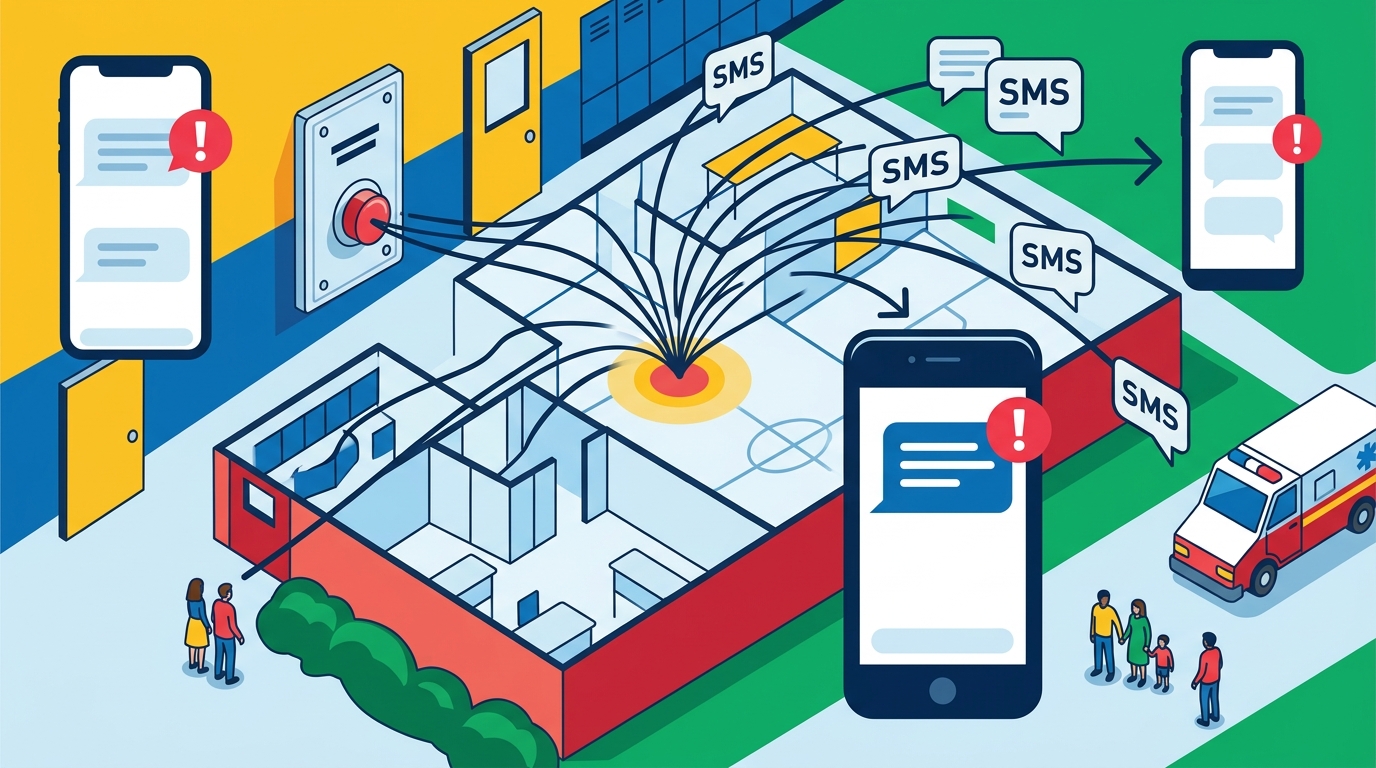
Understanding the sequence of events is crucial for effective response. The process begins with activation. A staff member or student pulls the alarm or presses the button on a wearable device. This action triggers the system, which immediately sends a signal to the central station. The central station then processes the alert and initiates the notification workflow. This includes sending text messages to designated contacts, such as administrators, security staff, and first responders. The system also activates local alerts, such as strobe lights and audio messages, to inform building occupants. The entire process is designed to happen within seconds, ensuring that responders are notified before they would be via a traditional 911 call.
Step-by-Step Activation
1. Activation: The user pulls the alarm or presses the button. 2. Signal Transmission: The device sends a signal via cellular or wired connection to the central station. 3. Processing: The central station verifies the signal and identifies the location and type of emergency. 4. Notification: The system sends text messages to all designated contacts. 5. Local Alert: Strobe lights and audio messages are activated in the affected area. 6. Two-Way Communication: Contacts can reply to the text messages to provide status updates. This sequence ensures that all parties are informed and can take appropriate action quickly.
Role of Command and Control
The Command and Control (C2) platform is the software interface that allows administrators to manage the incident. It provides a dashboard where they can see the status of all alerts, view live maps, and communicate with responders. The C2 platform also allows for the management of contact lists, ensuring that the right people are notified for each type of emergency. For example, a medical alert might notify the nurse and the principal, while a security alert might notify the police and the security team. This granularity ensures that the response is targeted and efficient.
What It Costs: Pricing Drivers
The cost of a text-first notification system varies based on several factors. The primary drivers are the number of devices, the number of contacts, and the level of integration. A basic system with a few pull stations and a small contact list will be less expensive than a comprehensive system with dozens of devices and integrations with access control and PA systems. Monthly monitoring fees are also a significant cost component. These fees cover the operation of the central station and the delivery of notifications. It is important to get a detailed quote that breaks down all costs, including installation, hardware, and monthly fees. Avoid hidden costs, such as fees for additional contacts or integrations.
Hardware vs. Software Costs
Hardware costs include the pull stations, wearable devices, and any necessary cabling. These are one-time costs, but they can add up quickly if you have a large campus. Software costs are typically recurring and cover the C2 platform and notification services. Some vendors charge per device, while others charge per contact. It is important to understand the pricing model and how it scales as your needs grow. For example, if you add new staff members, will you be charged for each new contact? A transparent pricing model is essential for long-term budgeting.
Total Cost of Ownership
What Goes Wrong: Common Mistakes
Many schools make mistakes that compromise the effectiveness of their notification systems. One common mistake is failing to test the system regularly. Without regular testing, you may not know that the system is not working until it is too late. Another mistake is not keeping contact lists up to date. If a staff member leaves the school and their number is still on the list, they will receive unnecessary alerts, which can lead to alert fatigue. Alert fatigue is a serious issue, as it can cause people to ignore legitimate alerts. To avoid this, regularly review and update your contact lists and test the system to ensure that only the right people are receiving alerts.
Alert Fatigue
Alert fatigue occurs when users are exposed to too many non-critical alerts, causing them to ignore or delay their response to critical ones. This is a significant risk with text-based systems, as they are easy to send. To mitigate this, use the system only for genuine emergencies and critical information. Avoid using it for routine announcements or non-urgent updates. Train your staff on the importance of alert discipline and the consequences of alert fatigue. By maintaining a high standard of alert quality, you can ensure that your system remains effective when it is needed most.
Integration Failures
Integration failures can also compromise the system. If the system is not properly integrated with your access control or PA systems, it may not be able to perform critical functions, such as locking doors or broadcasting audio messages. Test these integrations regularly to ensure that they are working correctly. If you experience any issues, contact your vendor immediately to resolve them. A well-integrated system is a more effective system, as it allows for a coordinated response across all aspects of your security infrastructure.
Versus Alternatives: App-Based vs. Text-First
App-based notification systems are popular, but they have significant drawbacks. The primary issue is that they require users to download and install an app. This creates a barrier to entry, as not all staff, students, and parents will download the app. Additionally, app notifications can be suppressed by battery optimization settings or do-not-disturb modes, which can delay or prevent delivery. Text messages, on the other hand, have a near-universal open rate and are less likely to be suppressed. They also do not require an internet connection, making them more reliable in areas with poor connectivity. While app-based systems offer richer features, such as push notifications and in-app updates, the reliability of text messages makes them a better choice for critical emergency notifications.
Reliability Comparison
Text messages are delivered through cellular networks, which are highly reliable and redundant. App-based notifications rely on internet connectivity, which can be less reliable, especially in rural areas or during network outages. A text-first system is therefore more likely to deliver critical alerts in a variety of conditions. This is a crucial consideration for schools, where the safety of students and staff depends on the timely delivery of information. By choosing a text-first system, you are choosing reliability over features, which is the right trade-off in an emergency.
User Adoption
User adoption is another key factor. Text messages are familiar to everyone, requiring no training or onboarding. App-based systems require users to download the app, create an account, and enable notifications. This process can be time-consuming and confusing, leading to low adoption rates. A text-first system ensures that all users can receive alerts immediately, without any additional steps. This simplicity is a major advantage, as it ensures that your entire community is covered by your notification system.
For a Specific Situation: Rural vs. Urban Schools
The needs of rural and urban schools differ, and your notification system should reflect these differences. Rural schools often have limited cellular coverage, which can affect the reliability of text-based systems. In these areas, it is important to choose a system that uses multiple carriers and has backup communication pathways, such as satellite or radio. Urban schools, on the other hand, typically have robust cellular coverage, but they may face challenges with network congestion during peak times. In these areas, a system with high throughput and low latency is essential. BluePoint Alert Solutions offers solutions that are tailored to the specific needs of different environments, ensuring that your system is reliable regardless of your location.
Rural Considerations
In rural areas, the distance to emergency responders can be a significant factor. A text-first system can help bridge this gap by providing immediate notification to local law enforcement and EMS. This can significantly reduce response times, which is critical in life-threatening situations. Additionally, rural schools may have fewer staff members, so it is important to ensure that your contact lists are comprehensive and up to date. By using a text-first system, you can ensure that all available resources are mobilized quickly and efficiently.
Urban Considerations
In urban areas, the density of the population can lead to network congestion, which can delay the delivery of text messages. To mitigate this, choose a system that uses multiple carriers and has high-priority messaging capabilities. This ensures that your alerts are delivered quickly, even during peak times. Additionally, urban schools may have more complex security needs, such as the need to coordinate with multiple agencies. A text-first system with robust integration capabilities can help you manage these complexities and ensure a coordinated response.
Rules and Protections: Compliance and Privacy
When implementing a text-based notification system, you must comply with relevant laws and regulations. The Telephone Consumer Protection Act (TCPA) regulates the sending of text messages to mobile phones. It requires that you have prior express written consent from the recipient before sending them marketing or promotional messages. However, emergency alerts are generally exempt from these requirements, as they are considered transactional messages. Nevertheless, it is important to ensure that you have the consent of your users to send them emergency alerts. This can be obtained during the enrollment process, where users agree to receive emergency notifications. Additionally, you must comply with data privacy laws, such as the Family Educational Rights and Privacy Act (FERPA), which protects the personal information of students. Ensure that your vendor has robust data security measures in place to protect this information.
FERPA Compliance
FERPA protects the privacy of student education records. When using a text-based notification system, you must ensure that the personal information of students and staff is protected. This includes their names, phone numbers, and any other data that is collected by the system. Your vendor should have a data privacy policy that outlines how they handle and protect this information. They should also have measures in place to prevent unauthorized access to the data. By ensuring FERPA compliance, you can protect the privacy of your community and avoid legal liabilities.
Emergency Alert Exemptions
While the TCPA regulates most text messages, emergency alerts are generally exempt from its requirements. This is because emergency alerts are considered necessary for the safety and well-being of the recipient. However, it is still important to obtain consent from your users to send them emergency alerts. This can be done by including a consent form in your enrollment process, where users agree to receive emergency notifications. By obtaining consent, you can ensure that you are in compliance with the law and that your users are comfortable receiving your alerts.
Local Specifics: Regional Considerations
Local regulations and emergency management protocols can vary by region. It is important to understand the specific requirements of your local jurisdiction and ensure that your notification system complies with them. For example, some states have specific laws regarding the use of emergency notification systems in schools. These laws may dictate the type of system that must be used, the frequency of testing, and the content of the alerts. By understanding these local specifics, you can ensure that your system is compliant and effective. Additionally, local emergency management agencies may have specific protocols for coordinating with schools during emergencies. It is important to work with these agencies to ensure that your system is integrated with their response plans.
State and Local Laws
State and local laws can have a significant impact on your notification system. For example, some states require schools to have a specific type of emergency notification system, such as a text-based system or an app-based system. Others may require that the system be tested a certain number of times per year. By understanding these laws, you can ensure that your system is compliant and that you are meeting the expectations of your local regulators. It is also important to work with your local emergency management agency to ensure that your system is integrated with their response plans. This can help to ensure a coordinated and effective response during emergencies.
Community Expectations
Community expectations can also influence your choice of notification system. In some communities, there may be a strong preference for text-based systems, while in others, app-based systems may be more popular. It is important to understand the expectations of your community and choose a system that meets them. By engaging with your community and understanding their needs, you can ensure that your system is well-received and effective. This can help to build trust and confidence in your emergency response capabilities.
Timing: When to Act and Why It Matters
Timing is critical in an emergency. The faster you can notify responders and building occupants, the better the outcome. A text-first system is designed to provide immediate notification, often within seconds of activation. This is significantly faster than traditional methods, such as calling 911 or using a PA system. By reducing the time to notification, you can reduce the time to response, which can save lives. It is important to test your system regularly to ensure that it is working correctly and that the timing is as expected. By monitoring the performance of your system, you can identify any issues and address them before they become critical.
Response Time Metrics
Response time is a key metric for evaluating the effectiveness of your notification system. It is the time between activation and the arrival of responders. By tracking this metric, you can identify any delays in the process and address them. For example, if the time to notification is fast but the time to response is slow, it may indicate that there is a delay in the dispatch process. By working with your local emergency management agency, you can identify and address these delays. By continuously monitoring and improving your response time, you can ensure that your system is as effective as possible.
Drills and Exercises
Regular drills and exercises are essential for testing the timing of your notification system. These drills should simulate real-world scenarios and test the entire process, from activation to response. By conducting these drills, you can identify any issues and address them before they become critical. It is important to involve all stakeholders in these drills, including staff, students, and local emergency responders. By working together, you can ensure that your system is effective and that everyone knows what to do in an emergency.
Results Over Time: Long-Term Outcomes
The long-term outcomes of a text-first notification system are measured by its reliability, effectiveness, and impact on safety. A reliable system is one that delivers alerts consistently and accurately. An effective system is one that reduces response times and improves outcomes. By tracking these metrics over time, you can evaluate the performance of your system and make improvements as needed. Additionally, a text-first system can have a positive impact on the safety culture of your school. By demonstrating a commitment to safety and security, you can build trust and confidence in your community. This can lead to improved engagement and participation in safety initiatives.
Measuring Success
Success can be measured by several metrics, including the number of alerts delivered, the time to notification, and the time to response. By tracking these metrics, you can identify trends and make data-driven decisions about your system. For example, if the time to notification is increasing over time, it may indicate that there is a problem with the system. By addressing this problem, you can improve the performance of your system. Additionally, you can measure the impact of your system on safety outcomes, such as the number of injuries or fatalities. By tracking these outcomes, you can demonstrate the value of your system to your stakeholders.
Continuous Improvement
Continuous improvement is essential for maintaining the effectiveness of your notification system. By regularly reviewing your system and making improvements, you can ensure that it remains up to date and effective. This includes updating your contact lists, testing your system, and training your staff. By committing to continuous improvement, you can ensure that your system remains a valuable asset to your school. It is also important to stay up to date with the latest technology and best practices. By doing so, you can ensure that your system is as effective as possible.
Key Takeaways
- A text-first system is more reliable than an app-based system, as it does not depend on app permissions or internet connectivity.
- Choose a vendor with a UL-listed and FM-approved central station to ensure high reliability and redundancy.
- Test your system regularly to ensure that it is working correctly and that your contact lists are up to date.
- Comply with relevant laws and regulations, such as the TCPA and FERPA, to protect the privacy of your users.
- Work with your local emergency management agency to ensure that your system is integrated with their response plans.
- Track key metrics, such as response time and alert delivery, to evaluate the performance of your system.
- Commit to continuous improvement to ensure that your system remains effective over time.
Frequently Asked Questions
Does a text-based system require an app?
No, a text-based system does not require an app. It sends standard SMS messages to mobile phones, which can be received by any device with a cellular connection. This makes it more accessible and reliable than app-based systems.
How fast is a text-based notification?
A text-based notification is typically delivered within seconds of activation. The exact time depends on the system and the cellular network, but it is generally much faster than traditional methods like calling 911.
Can I use a text-based system for both security and medical emergencies?
Yes, a text-based system can be configured to handle both security and medical emergencies. You can set up different contact lists for each type of emergency, ensuring that the right people are notified.
What happens if the cellular network goes down?
A robust text-based system uses multiple carriers and backup communication pathways, such as satellite or radio, to ensure that alerts are delivered even if the primary cellular network goes down.
How do I verify that a vendor's central station is compliant?
You can verify that a vendor's central station is compliant by checking for UL and FM listings through the respective certification bodies' online databases. You can also request a copy of the station's certification documents from the vendor.
Is a text-based system more expensive than an app-based system?
The cost of a text-based system depends on the number of devices, contacts, and integrations. It is not necessarily more expensive than an app-based system, but it is important to get a detailed quote that breaks down all costs.