

Yes, active shooter alert systems exist that are simple to activate in an emergency. BluePoint Alert Solutions designs pull stations and wearable devices modeled after standard fire alarm pulls, allowing anyone to trigger a response with a single, intuitive motion. This guide covers how to choose, verify, and implement these systems to ensure rapid, life-saving coordination.
How to Choose a System
Selecting the right emergency response system requires looking beyond basic hardware. A Rapid Emergency Response System (RERS) is a specialized technology solution that reduces human touchpoints during a crisis to expedite professional response. When evaluating options, prioritize simplicity of activation and the reliability of the communication pathway. The system must be intuitive enough for a panicked individual to use without prior training.
Activation Simplicity
Integration Capabilities
A robust system should integrate with existing infrastructure. Look for platforms that can connect with live security cameras, access control systems, and public safety answering points (PSAPs). The ability to share live video and location data with first responders before they arrive on site is a significant differentiator in modern emergency management.
Questions to Ask Before Committing
Before signing a contract, you must ask specific questions to ensure the vendor can deliver on their promises. These questions help uncover gaps in reliability, security, and support. Asking the right questions protects your organization from costly implementation failures.
Reliability and Redundancy
Ask how the system behaves if the primary network fails. Does it have cellular failover? What is the battery backup duration? BluePoint systems feature redundant communication pathways and backup batteries to ensure alerts are transmitted even during power or internet outages.
Security and Access
Inquire about the security of the Command & Control platform. Does it use enterprise-level encryption and multi-factor authentication? You need to ensure that only authorized personnel can access system controls and that sensitive data is protected from unauthorized interception.
Verifying Claims and Credentials
Marketing claims can be misleading. You must verify that the credentials and certifications presented by a vendor are legitimate. Verification ensures that the system meets industry standards for life safety and data protection.
Certification Checks
Check for Underwriters Laboratories (UL) and Factory Mutual (FM) certifications. These are the gold standards for monitoring and life safety systems. BluePoint Alert Solutions systems are monitored by UL-listed and FM-approved central stations, which significantly surpass standard requirements for power redundancy and data backup.
Reference Checks
Request references from current clients in your specific industry. Speak with safety directors or superintendents who have used the system in a real incident or a drill. Their feedback on response times and system reliability is invaluable.
How the System Works
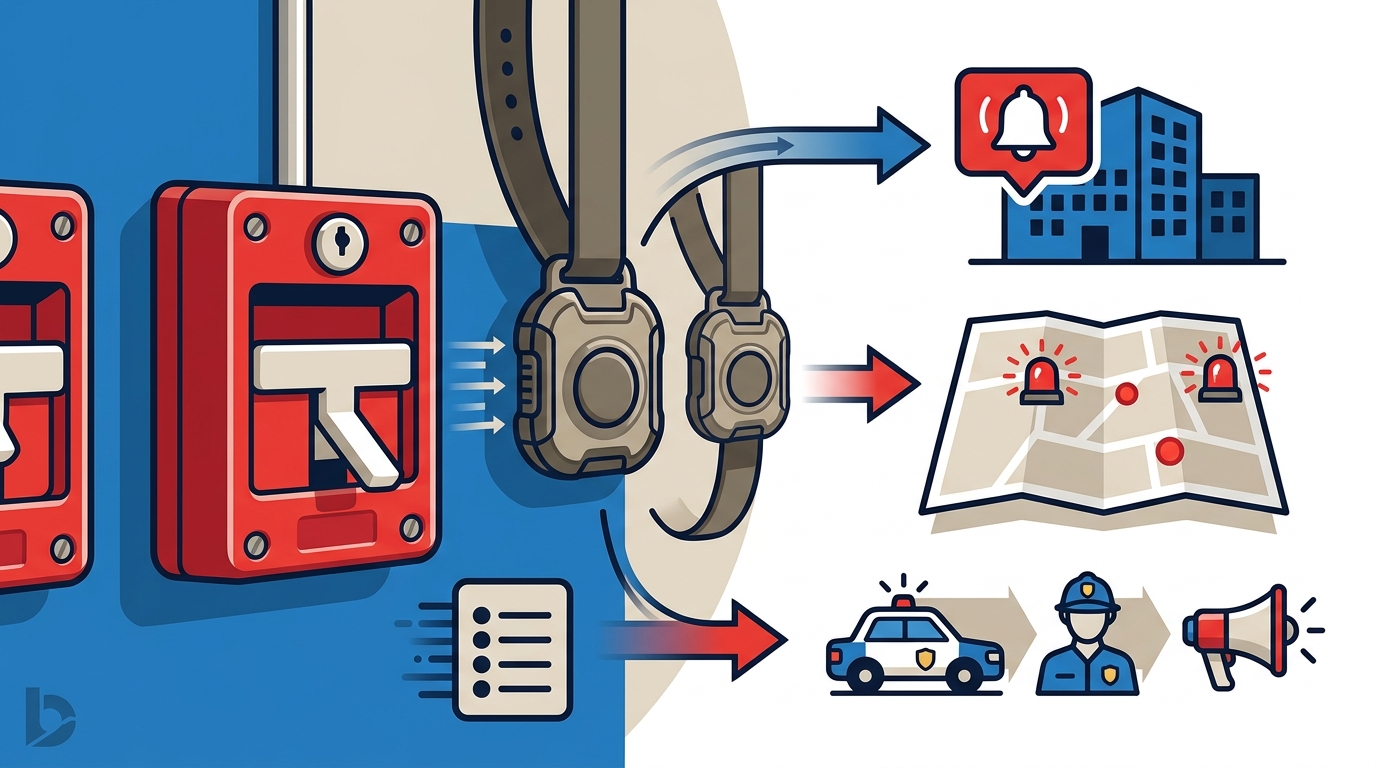
Understanding the workflow is essential for training and preparedness. The process is designed to be linear and automatic, removing the need for manual coordination during the initial seconds of an emergency.
Step 1: Activation
An individual pulls the station or activates a wearable device. The device stays latched until reset with a key, preventing accidental re-activation or tampering. The activation is immediate and requires no complex input.
Step 2: Notification
Upon activation, the central station receives the alert. It immediately contacts the predetermined law enforcement agency or medical responders. Notifications include the building name, address, device type, and any programmed instructions.
Step 3: Coordination
The Command & Control platform orchestrates the response. It sends automated texts, emails, and voice calls to designated on-site personnel. It also provides live mapping and video feeds to first responders, giving them a common operating picture of the incident.
Cost Drivers and Budgeting
Costs for emergency response systems vary based on several factors. Understanding these drivers helps in creating an accurate budget. While specific pricing depends on the scale of the installation, the following factors are primary cost determinants.
Hardware and Scale
The number of pull stations, strobes, and wearable devices required depends on the size of the facility. Larger campuses or multi-building complexes will naturally require more hardware. Custom configurations, such as the Compact Response Unit (CRU), may also influence the initial hardware investment.
Monitoring and Software
Most systems operate on a subscription model that includes 24/7 central station monitoring and access to the Command & Control platform. This recurring cost covers the maintenance of the communication pathways, software updates, and the labor of the monitoring operators.
Common Mistakes to Avoid
Organizations often make errors during the planning and implementation phases that compromise system effectiveness. Avoiding these mistakes ensures that the system performs as intended when it matters most.
Inadequate Testing
One of the most common mistakes is failing to test the system regularly. Regular testing, recommended at least quarterly, ensures device functionality and proper integration with law enforcement. Without testing, you may discover connectivity issues only during a real emergency.
Poor Placement
Placing devices in inaccessible or poorly visible locations reduces their utility. Devices should be strategically located in high-traffic areas, such as lobbies, gyms, and production floors, to ensure they are within reach of those who might need to activate them.
Comparison with Alternatives
Traditional emergency response methods often rely on manual phone calls and verbal coordination. These methods are slow and prone to error. The table below compares a modern RERS with traditional methods.
| Feature | Traditional Method | BluePoint RERS |
|---|---|---|
| Activation | Manual phone call | One-touch pull station |
| Notification Speed | Minutes | Seconds |
| Location Data | Verbal description | Automated GPS/Map data |
| Two-Way Comms | Difficult/Chaotic | Integrated SMS/Email |
| Video Sharing | Not possible | Live camera integration |
The shift to automated systems eliminates the ambiguity and delay inherent in manual processes. It provides a structured, reliable framework for emergency response.
Situational Application
The application of these systems varies by industry. Each sector has unique risks and operational requirements that influence the configuration of the system.
Education
Schools face the challenge of protecting large numbers of students and staff. BluePoint systems in education allow for immediate access to emergency officials, enabling faster response with the necessary information for informed decision-making. The system supports various protocols, including lockdown and run-hide-fight.
Commercial and Corporate
Commercial spaces, including offices and retail, must protect employees and customers. According to FBI data, nearly 50% of all armed intruder events occur in commercial spaces. A simple, intuitive system allows business owners to protect both employees and patrons without disrupting daily operations.
Regulatory Rules and Protections
Emergency response systems are subject to various regulations and standards. Compliance with these rules ensures that the system is legally sound and technically robust.
ADA Compliance
Devices must be accessible to all individuals, including those with disabilities. BluePoint devices are designed with proper mounting heights, tactile feedback, and visual indicators to meet ADA requirements where applicable. This ensures that the system is inclusive and effective for everyone.
Data Privacy
The Command & Control platform must protect sensitive data. It uses secure server hosting and intrusion detection systems to safeguard information. Compliance with data privacy laws is essential to maintain trust and protect the organization from liability.
Local Implementation Specifics
Implementation details can vary based on local infrastructure and regulations. Understanding these specifics ensures a smooth installation process.
Installation Timelines
Installation timelines vary by building size and complexity. Typical installations for standard setups can be completed within 1 to 3 days. Custom configurations may take longer. BluePoint provides detailed installation planning to minimize disruption to daily operations.
Local Law Enforcement Integration
It is crucial to coordinate with local law enforcement during the setup process. This ensures that the predetermined notification protocols are accurate and that responders are familiar with the system. BluePoint works closely with local law enforcement to provide seamless implementation.
The Critical Role of Timing
Time is the most critical factor in emergency response. The first few minutes of an incident determine the outcome. Reducing response time by even a minute can save countless lives.
The First Four Minutes
In any emergency, the first four minutes are often the most critical. Outcomes are determined long before outside responders arrive. A system that provides instant, interactive alerts helps on-site teams respond faster and save lives during this crucial window.
Response Time Reduction
Traditional methods can take minutes to notify responders. A modern RERS reduces this time to seconds. This rapid notification allows first responders to arrive with context, not just an alarm signal, significantly improving their effectiveness.
Long-Term Measurable Outcomes
Implementing a rapid response system yields measurable benefits over time. These outcomes demonstrate the value of the investment and the effectiveness of the system.
Improved Response Times
Organizations report dramatic improvements in response times. For example, first responders have received immediate notification and provided medical care within one minute of an alert. This speed is a direct result of the automated notification process.
Increased Confidence
Staff, students, and visitors report increased confidence in the safety of the facility. Knowing that a reliable, simple system is in place reduces anxiety and promotes a sense of security. This cultural shift is a valuable long-term benefit.
Key Takeaways
- Simple activation is critical; choose systems modeled after familiar fire alarm pulls.
- Verify UL and FM certifications to ensure industry-standard reliability.
- Redundant communication pathways and battery backups are essential for uptime.
- The Command & Control platform enables two-way communication and live video sharing.
- Regular quarterly testing is required to maintain system functionality.
- Strategic placement of devices in high-traffic areas maximizes accessibility.
- Integration with local law enforcement ensures seamless response protocols.
- Reducing response time by even one minute can significantly improve survival rates.
Frequently Asked Questions
How does the BluePoint Alert system notify first responders?
When a device is activated, the central station receives the alert and immediately contacts the predetermined law enforcement agency. Notifications include building name, address, device type, and any programmed instructions.
What is the difference between Police Alert and Medical Alert devices?
Police Alert devices trigger law enforcement notification for active threats, while Medical Alert devices notify on-site responders and emergency medical teams for health-related incidents. Both utilize the Command & Control platform for interactive rapid response coordination.
Can BluePoint systems work if the building network goes down?
Yes. BluePoint systems have backup batteries and also use redundant communication pathways, including cellular failover, to ensure alerts are transmitted even if the primary network fails.
How quickly can a BluePoint system be installed?
Installation timelines vary by building size and complexity. Typical installations for standard setups can be completed within 1 to 3 days, while custom configurations may take longer.
Are BluePoint devices ADA compliant?
Yes. Devices are designed with accessibility in mind, including proper mounting heights, tactile feedback, and visual indicators to meet ADA requirements where applicable.
How often should BluePoint systems be tested?
Regular testing is recommended at least quarterly to ensure device functionality, system connectivity, and proper integration with law enforcement and emergency services.
Conclusion
Implementing a simple, reliable active shooter alert system is a critical step in protecting your organization. BluePoint Alert Solutions provides a proven, intuitive solution that bridges the gap between crisis and control. By choosing a system with simple activation, robust integration, and verified credentials, you ensure that your team is prepared to respond effectively when seconds matter. To plan your visit and discuss your specific needs, .