

Yes, active shooter alert systems exist that are simple to activate in an emergency. These systems use intuitive hardware, such as pull stations or wearable pendants, to trigger immediate notifications to law enforcement and building occupants. This guide covers how to choose, verify, and implement these rapid response systems to ensure safety in schools, corporate offices, and public spaces.
How to Choose a System
Selecting the right emergency response system requires looking beyond basic alarm features. A Rapid Emergency Response System (RERS) is a specialized technology solution designed to reduce the number of human touchpoints during a crisis. When evaluating options, prioritize systems that offer true life-safety reliability, similar to fire alarm standards. The interface must be intuitive enough for use in high-stress scenarios without prior training. Look for platforms that provide two-way communication, allowing responders to receive real-time updates from building occupants.
Reliability and Redundancy
System reliability is the most critical factor in an active shooter scenario. The system must function even if the primary building network fails. Look for hardware with backup batteries and redundant communication pathways, such as cellular failover. These features ensure that alerts are transmitted to the central station and first responders regardless of local infrastructure outages.
Integration Capabilities
Modern safety ecosystems require integration with existing security infrastructure. A robust system should connect with live security camera feeds, access control systems, and mass notification platforms. This integration provides first responders with a common operating picture, including live maps and floor plans, which significantly improves decision-making speed during an incident.
Questions to Ask Before Committing
Before signing a contract, stakeholders must ask specific questions about the system's operational capabilities. Inquire about the exact notification pathway and how quickly alerts reach law enforcement. Ask whether the system supports wearable mobile devices, which allow staff or visitors to activate alerts from anywhere in the building. Understanding the scope of the Command and Control platform is also essential for ensuring effective coordination.
Notification Speed and Scope
Ask how many seconds it takes for an alert to reach the central station and dispatch. Clarify who receives the notification immediately. Does it go only to on-site security, or does it bypass 911 to contact the specific local law enforcement agency directly? Direct dispatch often results in faster response times because it provides precise location data and context immediately.
Two-Way Communication Features
Determine if the platform allows for interactive communication. Can building occupants send text or email updates to the command group? Can responders send instructions back to the building? These features are vital for situational awareness and managing the flow of people during an evacuation or lockdown.
Verifying Claims and Credentials
Many vendors make broad claims about their technology's effectiveness. To verify these claims, check for industry certifications and compliance standards. The system should be monitored by a central station that is listed by Underwriters Laboratories (UL) and approved by Factory Mutual (FM). These certifications ensure that the monitoring facility meets rigorous standards for power redundancy, data backup, and operator training.
Central Station Standards
Verify that the central station has multiple interconnected operating stations across the country. This geographic redundancy ensures that if one facility is affected by a disaster, the others can take over operations seamlessly. Check if the station uses multiple independent internet connections and has backup power sources that can run for extended periods without refueling.
Compliance with FEMA Recommendations
Ensure the communication platform aligns with the Federal Emergency Management Agency (FEMA) recommendations for Incident Command Structure and Multi-Hazard Communications. Compliance with these standards indicates that the system is designed to support professional emergency management protocols, not just simple alarm signaling.
How the System Works
Activation and Immediate Alerts
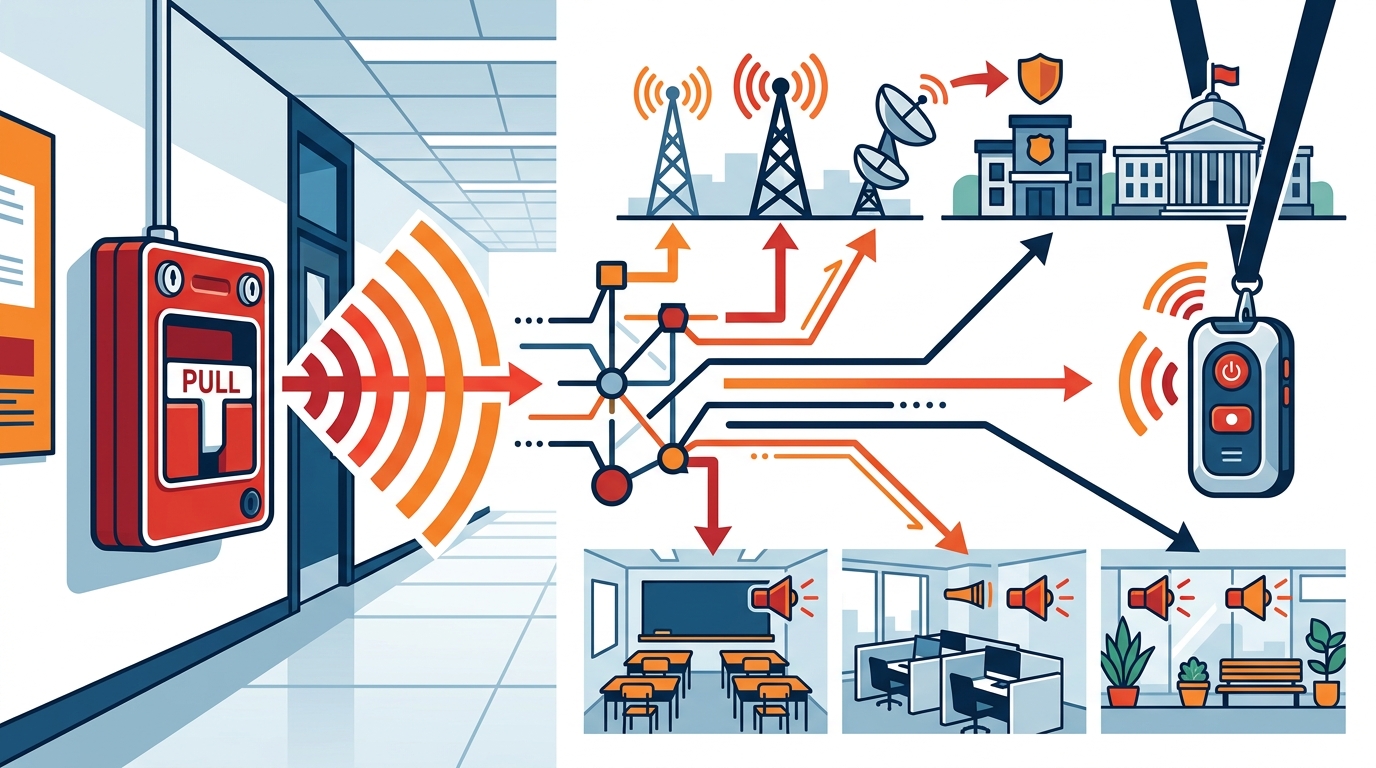
Activation is typically done via a manual pull station or a wearable mobile pendant. The design is modeled after standard fire alarm pulls, making it familiar and intuitive. Once activated, the device sends a signal to the central station. Simultaneously, the system triggers visual and audio notifications within the building, such as strobe lights and pre-recorded audio messages, to guide occupants.
Dispatch and Coordination
The central station receives the alert and immediately contacts the predetermined law enforcement agency. Notifications include the building name, address, device type, and any programmed instructions. The Command and Control platform then orchestrates on-site communication, delivering real-time situational awareness through live maps and connecting directly to public safety answering points (PSAPs) if configured.
Cost Factors and Pricing
The cost of an active shooter alert system varies based on the size of the facility and the complexity of the integration. Pricing is generally driven by the number of activation devices, the scope of the monitoring service, and the features of the software platform. It is important to view this investment as a cost-saving measure against the potential liability and human cost of a delayed response.
Hardware and Installation
Hardware costs depend on the type of devices used. Standard pull stations are generally less expensive than wearable pendants or integrated compact response units. Installation costs vary by building size and complexity. Typical installations for standard setups can be completed within one to three days, while custom configurations may take longer. Pre-fabricated units can reduce installation time and labor costs.
Monitoring and Software
Monthly fees typically cover the central station monitoring and access to the Command and Control platform. These fees ensure 24/7 coverage and maintenance of the software. Some systems offer tiered pricing based on the number of users or the level of integration with other security systems. It is advisable to request a detailed quote that breaks down hardware, installation, and recurring service costs.
Common Mistakes to Avoid
Organizations often make critical errors when implementing emergency response systems. One common mistake is relying solely on existing security cameras and access control without a dedicated rapid response system. While these tools are useful, they do not provide the immediate, interactive communication needed to save lives in the first few minutes of an incident.
Ignoring Training and Drills
Technology alone is not enough. People do not rise to the occasion in an emergency; they fall to the level of their training. Organizations must conduct regular drills to ensure that staff and occupants know how to activate the system and what to do after activation. Without training, the system's potential to save lives is significantly diminished.
Failure to Test Regularly
Regular testing is recommended at least quarterly to ensure device functionality and system reliability. Many organizations fail to test their systems frequently enough, leading to unexpected failures during a real emergency. Establishing a strict testing schedule and documenting the results is essential for maintaining system integrity.
Comparison with Alternatives
Traditional security systems and mass notification software often lack the specific features needed for active shooter response. The table below compares a dedicated Rapid Emergency Response System with traditional security setups.
| Feature | Traditional Security System | Rapid Emergency Response System |
|---|---|---|
| Activation Method | Keycard or complex keypad | Simple pull station or wearable pendant |
| Notification Speed | Depends on human response time | Automated in seconds |
| Two-Way Communication | Limited or none | Real-time text and email portal |
| Law Enforcement Integration | Manual 911 call | Direct dispatch with location data |
| Building-Wide Notification | Often limited to specific zones | Building-wide strobes and audio |
Dedicated systems offer a significant advantage in reducing response time. By automating the notification process and providing interactive tools, they bridge the gap between the start of an incident and the arrival of professional responders.
Situational Application
The application of these systems varies by industry. In education, the focus is on protecting students and staff in large, open environments. In corporate settings, the priority is often on protecting employees in offices and lobbies. Each sector has unique challenges that require tailored solutions.
Education Sector
Schools face the challenge of protecting a large number of minors. Systems in schools often include pull stations in classrooms, hallways, and outdoor areas. The Command and Control platform allows administrators to communicate with teachers and students, providing instructions and reassurance. This is critical for managing the psychological impact of an emergency.
Corporate and Commercial
Commercial spaces, including malls and offices, are public and accessible. According to FBI data, nearly 50% of all armed intruder events occur in commercial spaces. In these environments, wearable pendants are particularly useful for staff who move around the building. The system must be able to distinguish between a medical emergency and a security threat to ensure the appropriate response is triggered.
Rules and Protections
Implementing an active shooter alert system involves understanding legal and regulatory frameworks. While there are no specific federal laws mandating these systems, they are often recommended by safety organizations and may be required by local regulations. Organizations should consult with legal counsel to ensure their emergency plans comply with all applicable laws.
Liability and Duty of Care
Facility owners have a duty of care to protect those on their premises. Having a rapid response system in place can demonstrate that the organization has taken reasonable steps to ensure safety. This can be a factor in liability cases if an incident occurs. The system's ability to provide a documented record of the response can also be valuable in legal proceedings.
Privacy and Data Security
The Command and Control platform handles sensitive data, including location information and communication logs. It is essential to ensure that the platform uses enterprise-level encryption and multi-factor authentication to protect this data. Only authorized personnel should have access to the system controls and data. Compliance with data privacy regulations is a critical aspect of system security.
Local Implementation Specifics
Implementation details can vary based on the local jurisdiction and the specific needs of the facility. Local law enforcement agencies may have specific requirements for how they receive alerts and what data they expect. It is important to coordinate with local responders during the planning and installation phases.
Coordination with Local Law Enforcement
Working with local law enforcement ensures that the system is configured to meet their needs. This includes setting up the correct dispatch protocols and ensuring that responders have access to the necessary tools, such as live camera feeds and floor plans. Many organizations find that this collaboration leads to a more effective and efficient response.
Facility-Specific Considerations
The layout of the building and the types of spaces within it influence the placement of devices. High-traffic areas, such as lobbies and cafeterias, may require more devices than low-traffic areas. Outdoor spaces, such as parking lots and playgrounds, may also need coverage. A thorough site assessment is necessary to determine the optimal placement of activation and notification devices.
The Impact of Timing
Timing is the most critical factor in an active shooter incident. The first four minutes are often the most consequential, as outcomes are determined long before outside responders arrive. A rapid response system is designed to compress this timeline, ensuring that the right people are notified and begin responding immediately.
Reducing Response Time
By automating the notification process, these systems can reduce response time by seconds or even minutes. This reduction can be the difference between life and death. For example, a system that notifies police within seconds of activation allows them to begin en route immediately, rather than waiting for a manual 911 call to be placed and processed.
Coordinated On-Site Response
Timing is also important for on-site responders. The system's ability to provide real-time location data and two-way communication allows on-site teams to coordinate their actions effectively. This coordination ensures that responders are not working in the dark and can make informed decisions based on the latest information.
Long-Term Results
The long-term results of implementing a rapid response system include improved safety culture and reduced risk. Organizations that invest in these systems often see a positive shift in how they approach safety and security. Regular testing and training help maintain a high level of preparedness, ensuring that the system remains effective over time.
Continuous Improvement
Technology and best practices in emergency response are constantly evolving. A good system provider will offer ongoing support and updates to ensure that the system remains current. This includes software updates, hardware maintenance, and training refreshers. Continuous improvement is key to maintaining the system's effectiveness.
Measurable Outcomes
Organizations can measure the effectiveness of their system through regular drills and incident reviews. Metrics such as activation time, notification speed, and responder arrival time can be tracked and analyzed. This data can be used to identify areas for improvement and to demonstrate the value of the investment to stakeholders.
Key Takeaways
- A Rapid Emergency Response System (RERS) is a specialized technology solution designed to reduce human touchpoints during a crisis.
- Intuitive activation methods, such as pull stations and wearable pendants, are essential for use in high-stress scenarios.
- Reliability is paramount; look for systems with backup batteries and redundant communication pathways.
- Two-way communication features allow for real-time coordination between building occupants and responders.
- Verify that the central station is UL-listed and FM-approved to ensure high standards of monitoring.
- Regular testing and training are critical to maintaining system effectiveness and user preparedness.
- Timing is the most critical factor; reducing response time in the first few minutes can save lives.
- Long-term success depends on continuous improvement and coordination with local law enforcement.
Frequently Asked Questions
How does the BluePoint Alert system notify first responders?
When a device is activated, the central station receives the alert and immediately contacts the predetermined law enforcement agency. Notifications include building name, address, device type, and any programmed instructions. Alerts can also be sent to responders and administrators via SMS, email, and phone, even before dispatch has contacted responders.
What types of emergencies is BluePoint designed to handle?
BluePoint systems are designed for active threat incidents, medical emergencies, workplace violence, hazmat and weather emergencies, and other urgent situations requiring immediate law enforcement or emergency responder notification. Our systems provide interactive communication between parties and increased situational awareness with tools like video streams and live mapping tools.
What is the difference between BluePoint Police Alert and Medical Alert devices?
Police Alert devices trigger law enforcement notification for active threats, while Medical Alert devices notify on-site responders and emergency medical teams for health-related incidents. Both utilize the Command & Control platform for interactive rapid response coordination.
Can BluePoint systems provide alerts during off-hours or holidays?
Yes. Alerts are always transmitted to the designated first responders, on-site personnel and administrators regardless of time or day, ensuring 24/7 coverage.
Can BluePoint systems work if the building network goes down?
Yes. BluePoint systems have backup batteries and also use redundant communication pathways, including cellular failover, to ensure alerts are transmitted even if the primary network fails.
How secure is the BluePoint Command & Control platform?
Command & Control uses enterprise-level encryption, multi-factor authentication, and secure server hosting to protect sensitive data and ensure only authorized personnel can access system controls.
Are BluePoint devices ADA compliant and accessible?
Yes. Devices are designed with accessibility in mind, including proper mounting heights, tactile feedback, and visual indicators to meet ADA requirements where applicable.
How quickly can a BluePoint system be installed in a school or office?
Installation timelines vary by building size and complexity. Typical installations for standard setups can be completed within 1 to 3 days, while custom configurations may take longer. BluePoint provides detailed installation planning to minimize disruption.
How often should BluePoint systems be tested?
Regular testing is recommended at least quarterly to ensure device functionality, system reliability, and user preparedness.
What is the cost of a BluePoint system?
Costs vary based on the size of the facility and the complexity of the integration. Pricing is driven by the number of activation devices, the scope of the monitoring service, and the features of the software platform. It is advisable to request a detailed quote that breaks down hardware, installation, and recurring service costs.