
Medical Emergency Interactive Notification Systems for Industrial & Commercial Facilities
BluePoint Alert Solutions provides a medical emergency interactive notification system that connects all internal parties on one channel. This platform unifies on-site staff, security, and first responders through a single Command & Control interface. It eliminates fragmented communication during critical health incidents. This guide covers selection criteria, verification methods, operational workflows, and cost factors for industrial and commercial environments.
How to Choose the Right System
Selecting a medical emergency notification system requires distinguishing between simple alerting and true interactive coordination. A basic system sends a text message. An interactive system creates a two-way dialogue that allows responders to confirm status and receive real-time location data. For industrial and commercial facilities, the ability to connect all internal parties on one channel is the primary differentiator.
Interactive vs. One-Way Alerting
One-way systems notify a list of contacts but do not allow for feedback. This creates uncertainty during a medical event. Interactive platforms, such as the BluePoint Command & Control portal, enable building occupants to reply with their status. This provides the command group with immediate situational awareness. It reduces the time spent searching for the victim and verifying the situation.
Integration with Existing Infrastructure
The system must integrate with existing security and communication infrastructure. Look for solutions that support redundant communication pathways. Cellular failover is essential for industrial sites where Wi-Fi may be unstable. The system should also integrate with live security camera feeds. This allows responders to view the incident location before arriving on scene.
Scalability and Customization
Industrial facilities vary in size and layout. A scalable system allows for the addition of devices as the facility expands. Customization options for device labeling and aesthetics ensure the system blends into the environment. This reduces confusion for employees and visitors. The system should support both medical and security alerts to provide comprehensive coverage.
Specific Questions to Ask Vendors
Before committing to a vendor, ask specific questions that reveal the depth of their platform. These questions help identify gaps in functionality and reliability. Focus on technical capabilities and support structures.
Technical Capability Questions
Ask how the system handles network outages. Does it have battery backup and cellular failover? Inquire about the latency of notifications. How quickly are texts, emails, and voice calls sent after activation? Ask about the security of the platform. Does it use enterprise-level encryption and multi-factor authentication? These details determine the reliability of the system during a crisis.
Support and Maintenance Questions
Ask about the maintenance schedule. How often are firmware updates and battery checks performed? Inquire about the response time for technical support. Is there a dedicated team for implementation and training? Ask about the testing process. How are systems tested to ensure they are functioning correctly? Regular testing is critical for maintaining readiness.
Integration and Compatibility Questions
Ask how the system integrates with existing access control and fire alarm systems. Can it trigger door unlocks or lockdowns? Inquire about compatibility with wearable mobile devices. Can staff wear these devices to provide alerts from anywhere in the facility? Ask about the ability to customize notification lists. Can you designate specific medical responders for different areas of the building?
Verifying Claims and Credentials
Verifying vendor claims is essential to ensure the system meets safety standards. Do not rely solely on marketing materials. Check for independent certifications and client references.
Certifications and Standards
Look for UL and FM certifications for the monitoring station. These certifications ensure the system meets rigorous safety and reliability standards. Verify that the central station is UL-listed and FM-approved. This guarantees that the monitoring facility has redundant power and communication systems. Check for compliance with ADA requirements for device accessibility.
Client References and Case Studies
Request references from similar industrial or commercial facilities. Speak with current clients to understand their experience with the system. Ask about the response time during actual emergencies. Review case studies that detail specific outcomes. Look for evidence of reduced response times and improved coordination. This provides real-world validation of the vendor's claims.
Security and Data Protection
Verify the security protocols of the platform. Ask for details on data encryption and storage. Ensure that the vendor complies with data privacy regulations. Check for intrusion detection and prevention systems. These measures protect sensitive incident data from unauthorized access. A secure platform is critical for maintaining trust and compliance.
Operational Workflow and Timing
Understanding the operational workflow helps in planning and training. The process from activation to response is designed to minimize delay. Each step is automated to ensure speed and accuracy.
Activation and Notification
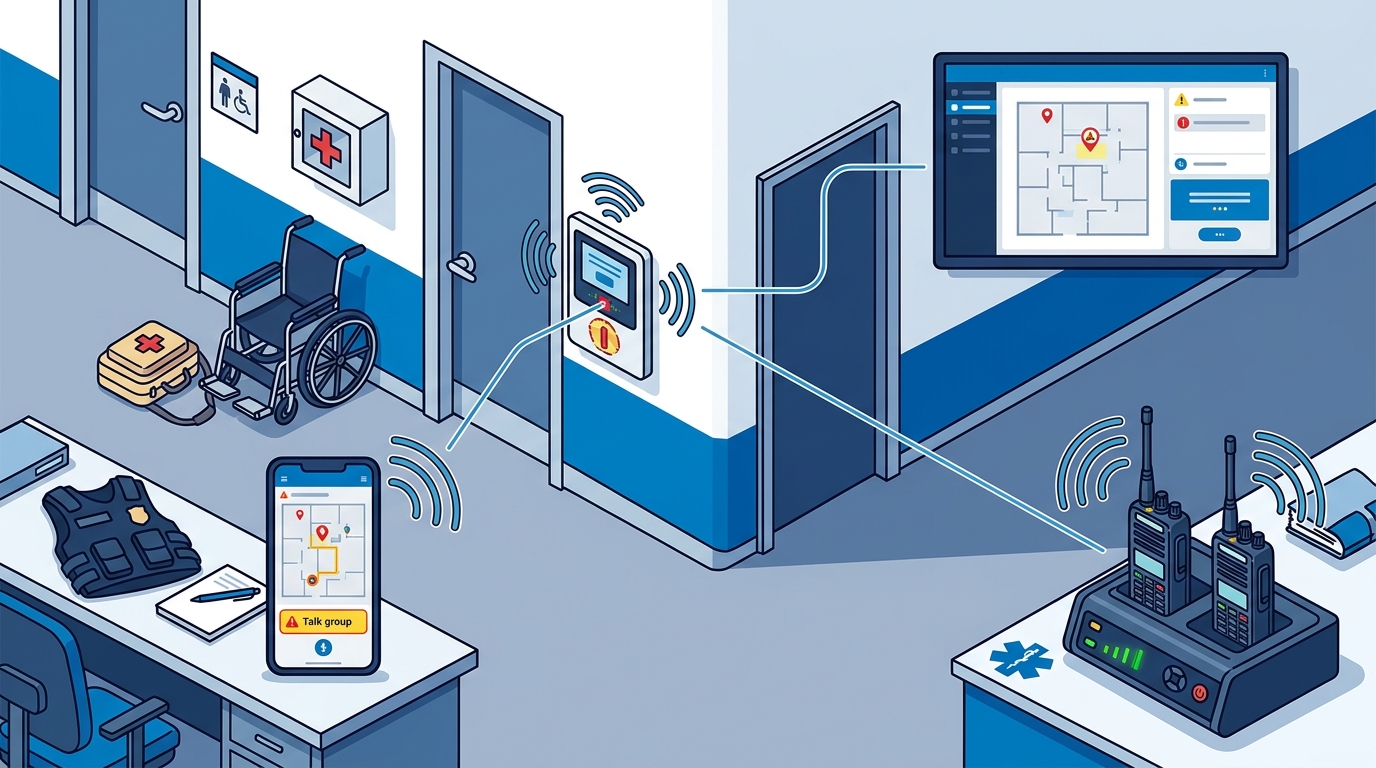
The process begins with the activation of a pull station or wearable device. The device sends a signal to the central station. The central station immediately notifies the designated medical responders. Notifications include the exact location of the incident. This allows responders to navigate directly to the victim.
Interactive Coordination
Once notified, responders can interact with the command group through the platform. They can confirm their status and provide updates. The command group can view live maps and camera feeds. This provides a common operating picture of the incident. Interactive communication reduces confusion and ensures coordinated action.
Response and Resolution
Responders arrive on scene and provide medical care. The command group continues to monitor the situation. They can update other stakeholders as needed. Once the incident is resolved, the system is reset. The entire process is designed to occur within minutes, significantly faster than traditional methods.
Cost Drivers and Budgeting
The cost of a medical emergency notification system varies based on several factors. Understanding these drivers helps in budgeting and justifying the investment.
Hardware and Installation
The number of devices required is a primary cost driver. Industrial facilities may need more devices due to their size and layout. Installation costs depend on the complexity of the site. Pre-fabricated units can reduce installation time and cost. Consider the long-term maintenance of hardware in your budget.
Subscription and Monitoring
Most systems require a monthly subscription for monitoring and platform access. The cost depends on the level of service and the number of users. Look for transparent pricing structures. Avoid hidden fees for additional features or users. The subscription covers the central station monitoring and software updates.
Training and Support
Common Mistakes to Avoid
Several common mistakes can undermine the effectiveness of a medical emergency notification system. Avoiding these pitfalls ensures the system delivers its intended benefits.
Inadequate Device Placement
Placing devices in inaccessible or low-visibility areas reduces their effectiveness. Devices should be located in high-risk areas and high-traffic zones. Ensure that devices are visible and easy to activate. Regular audits of device placement are necessary to maintain coverage.
Lack of Training
Without proper training, staff may not know how to use the system. This leads to delays and confusion during an emergency. Conduct regular training sessions and drills. Ensure that all employees understand the activation process and response protocols. Training builds instinct and improves decision-making under stress.
Ignoring Maintenance
Neglecting maintenance can lead to system failures. Regular testing and firmware updates are critical. Establish a maintenance schedule and adhere to it. Monitor battery levels and communication pathways. Proactive maintenance ensures the system is ready when needed.
Comparison with Alternatives
Comparing different types of notification systems helps in making an informed decision. Each alternative has its strengths and limitations.
| Feature | Interactive Notification System | One-Way Alert System | Manual Phone Calls |
|---|---|---|---|
| Two-Way Communication | Yes | No | Yes |
| Real-Time Location Data | Yes | Limited | No |
| Automated Notifications | Yes | Yes | No |
| Integration with Cameras | Yes | No | No |
| Response Time | Seconds | Seconds | Minutes |
Interactive systems offer the most comprehensive solution for industrial and commercial facilities. They provide real-time coordination and situational awareness. One-way systems are simpler but lack the depth of interaction. Manual phone calls are slow and prone to error. An interactive system is the best choice for minimizing response time and improving outcomes.
Application in Specific Scenarios
The application of the system varies by facility type and specific scenarios. Tailoring the system to the unique needs of the environment ensures maximum effectiveness.
Manufacturing Facilities
Manufacturing facilities have high-risk areas such as production floors and warehouses. Devices should be placed in these areas to provide rapid notification. The system should integrate with existing safety protocols. This ensures a coordinated response to injuries and accidents.
Corporate Offices
Corporate offices require a discreet yet effective solution. Devices can be placed in common areas such as lobbies and break rooms. The system should support wearable devices for staff who move throughout the building. This provides flexibility and coverage in a professional environment.
Large Public Spaces
Large public spaces such as malls and convention centers require scalable solutions. The system should support a high volume of users and devices. Interactive communication is essential for managing large crowds. The system should provide clear instructions to occupants to reduce panic.
Regulatory Rules and Protections
Compliance with regulatory rules and protections is essential for legal and operational reasons. Understanding these requirements ensures the system meets all necessary standards.
OSHA Requirements
The Occupational Safety and Health Administration (OSHA) requires employers to establish an Emergency Action Plan (EAP). The notification system should support the EAP by providing rapid communication. Ensure that the system complies with OSHA guidelines for emergency response. This protects the organization from liability and ensures employee safety.
ADA Compliance
The Americans with Disabilities Act (ADA) requires that emergency systems be accessible to all individuals. Devices should be mounted at appropriate heights and provide tactile and visual feedback. Ensure that the system meets ADA requirements. This ensures that all employees and visitors can use the system effectively.
Data Privacy Regulations
Data privacy regulations protect the personal information of employees and visitors. The system should comply with relevant data protection laws. Ensure that the vendor uses secure data storage and transmission. This protects sensitive incident data from unauthorized access and misuse.
Local Implementation Specifics
Local implementation specifics can affect the performance of the system. Understanding these factors ensures the system is tailored to the local environment.
Local Emergency Services
Coordinate with local emergency services to ensure seamless integration. The system should provide accurate location data to first responders. This reduces response time and improves outcomes. Establish relationships with local police and fire departments. This ensures that they are familiar with the system and can respond effectively.
Building Layout and Infrastructure
The layout and infrastructure of the building affect device placement and communication. Consider the size and complexity of the building. Ensure that the system can cover all areas effectively. Work with the vendor to design a layout that maximizes coverage and minimizes blind spots.
Local Regulations and Codes
Local regulations and building codes may impose additional requirements. Ensure that the system complies with all local standards. Consult with local authorities to understand any specific requirements. This ensures that the system is legally compliant and operationally effective.
Strategic Timing for Deployment
Timing is critical for the successful deployment of a medical emergency notification system. Acting at the right time ensures the system is in place before an emergency occurs.
Pre-Deployment Planning
Begin planning early to allow for thorough design and installation. Engage with stakeholders to understand their needs. Develop a detailed implementation plan. This ensures that the system is tailored to the facility's specific requirements. Early planning reduces delays and ensures a smooth deployment.
Installation and Testing
Installation should be completed before the system is put into service. Conduct thorough testing to ensure all components are functioning correctly. Test the system under various scenarios to identify any issues. This ensures that the system is ready for real-world use. Testing is a critical step in the deployment process.
Ongoing Maintenance and Updates
After deployment, ongoing maintenance and updates are essential. Schedule regular testing and maintenance. Update the system as needed to reflect changes in the facility or regulations. This ensures that the system remains effective over time. Proactive maintenance is key to long-term success.
Long-Term Measurable Outcomes
Measuring long-term outcomes helps in evaluating the effectiveness of the system. Tracking key metrics provides insight into the system's impact on safety and response times.
Response Time Metrics
Track the time from activation to responder arrival. Compare this to baseline response times. A reduction in response time indicates an improvement in the system's effectiveness. Regularly review these metrics to identify areas for improvement. This ensures that the system continues to deliver optimal performance.
Incident Outcomes
Monitor the outcomes of medical incidents. Track the number of incidents and their severity. A reduction in severe injuries and fatalities indicates a positive impact. Analyze the data to identify trends and patterns. This provides insight into the system's effectiveness and areas for improvement.
User Feedback and Satisfaction
Collect feedback from users to assess their satisfaction with the system. Conduct surveys and interviews to gather qualitative data. This provides insight into the user experience and areas for improvement. Positive feedback indicates that the system is meeting user needs. Address any negative feedback to enhance the system's effectiveness.
Key Takeaways
- Interactive notification systems provide two-way communication and real-time location data, significantly improving response coordination.
- Verify vendor claims by checking for UL and FM certifications and reviewing client references.
- The operational workflow involves activation, automated notification, interactive coordination, and response, all designed to minimize delay.
- Cost drivers include hardware, installation, subscription, and training. Budget for all these components to ensure a comprehensive solution.
- Common mistakes include inadequate device placement, lack of training, and ignoring maintenance. Avoid these pitfalls to ensure system effectiveness.
- Interactive systems outperform one-way alert systems and manual phone calls in terms of response time and coordination.
- Compliance with OSHA, ADA, and data privacy regulations is essential for legal and operational reasons.
- Long-term outcomes can be measured through response time metrics, incident outcomes, and user feedback.
Frequently Asked Questions
How does the BluePoint Alert system notify first responders?
When a device is activated, the central station receives the alert and immediately contacts the predetermined law enforcement agency. Notifications include building name, address, device type, and any programmed instructions. Alerts can also be sent to responders and administrators via SMS, email, and phone, even before dispatch has contacted responders.
What types of emergencies is BluePoint designed to handle?
BluePoint systems are designed for active threat incidents, medical emergencies, workplace violence, hazmat and weather emergencies, and other urgent situations requiring immediate law enforcement or emergency responder notification. Our systems provide interactive communication between parties and increased situational awareness with tools like video streams and live mapping tools.
What is the difference between BluePoint Police Alert and Medical Alert devices?
Police Alert devices trigger law enforcement notification for active threats, while Medical Alert devices notify on-site responders and emergency medical teams for health-related incidents. Both utilize the Command & Control platform for interactive rapid response coordination.
Can BluePoint systems provide alerts during off-hours or holidays?
Yes. Alerts are always transmitted to the designated first responders, on-site personnel and administrators regardless of time or day, ensuring 24/7 coverage.
Can BluePoint systems work if the building network goes down?
Yes. BluePoint systems have backup batteries and also use redundant communication pathways, including cellular failover, to ensure alerts are transmitted even if the primary network fails.
How secure is the BluePoint Command & Control platform?
Command & Control uses enterprise-level encryption, multi-factor authentication, and secure server hosting to protect sensitive data and ensure only authorized personnel can access system controls.
Are BluePoint devices ADA compliant and accessible?
Yes. Devices are designed with accessibility in mind, including proper mounting heights, tactile feedback, and visual indicators to meet ADA requirements where applicable.
How quickly can a BluePoint system be installed in a school or office?
Installation timelines vary by building size and complexity. Typical installations for standard setups can be completed within 1–3 days, while custom configurations may take longer. BluePoint provides detailed installation planning to minimize disruption.
How often should BluePoint systems be tested?
Regular testing is recommended at least quarterly to ensure device functionality, system connectivity, and proper integration with law enforcement and emergency services.
What maintenance is required for BluePoint systems?
Maintenance is minimal. Periodic firmware updates, battery checks (for wireless units), and general visual inspections are sufficient.